
















Migrate Your WordPress Site to Astro

Tired of plugin updates, security scares, and hosting bills that never stop? I rebuild WordPress sites in Astro with Sanity or MDX: every post migrated, every URL preserved, rankings intact, and nothing left to patch on a Tuesday night. From $1,250, fixed quote after a free audit.

Get a Free Migration Audit
WordPress to Astro migration with SEO preserved

Why move from WordPress to Astro?

WordPress still powers a third of the web, and for plugin-dependent sites it remains the right tool. But most marketing sites use it as an expensive, fragile blog engine. Astro does that job faster, safer, and nearly free to host.

WordPress to Astro migration for faster performance
Performance Your Theme Can't Reach

Themes, page builders, and plugin scripts pile JavaScript onto every page. Astro ships almost none, so content pages routinely hit 95+ Lighthouse scores.

WordPress to Astro migration removes plugin maintenance
No More Plugin Roulette

Every WordPress feature is a plugin to update, patch, and pray over. In Astro, features are code in your repo: nothing auto-updates behind your back, nothing conflicts.

WordPress to Astro migration cuts hosting costs
Hosting From $0, Not $30+

Managed WordPress hosting runs $25 to $100 per month before backups and staging. A static Astro site runs on Netlify or Cloudflare for $0 to $20, with no server to babysit.

WordPress content mapped to Sanity CMS or MDX
A CMS That Fits Your Team

Posts, pages, custom post types, and ACF fields map into Sanity for visual editing or MDX for markdown. Your content becomes portable instead of trapped in a database.

WordPress design preserved in the Astro rebuild
Design Preserved or Improved

Your current design is rebuilt pixel accurate, or refreshed if you want the migration to double as a redesign. Either way it stops depending on a theme you cannot safely update.

Static Astro output shrinks the security surface
Security Surface Near Zero

No PHP, no database, no wp-admin to brute force. Static files leave almost nothing to attack, so the security plugin stack and its subscriptions become unnecessary.

WordPress vs Astro

Migration Guide
Feature WordPress Astro
Hosting Managed WP, $25 to $100/mo Netlify or Cloudflare, $0 to $20/mo
Maintenance Weekly plugin and core updates Occasional dependency updates
Security PHP, database, login surface Static files, near zero surface
Performance Depends on theme and caching stack Excellent, minimal JavaScript
Editing wp-admin or page builder Sanity studio or markdown
Best for Plugin-heavy sites: membership, LMS, WooCommerce Content and marketing sites

Selected Works

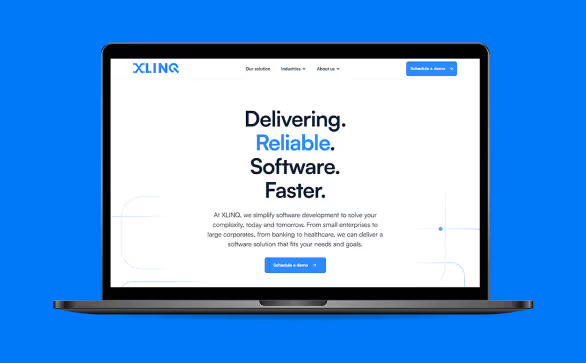
Xlinq - Figma to Webflow development
Xlinq
View Project Info
Client
Xlinq
Service
Figma to Webflow
Live Site
Project Intro

XLINQ simplifies enterprise software by turning your business knowledge into secure, scalable applications built faster and smarter. They reached out to me with a Figma design for a new website for their company.

What I Did

I closely collaborated with the Xlinq team to transform their Figma design into a fully functional, responsive Webflow site with subtle animations and interactions as requested.

PageSpeed Insights
PageSpeed Insights scores showing 97 Performance, 89 Accessibility, 96 Best Practices, and 92 SEO.
Client Review

"Sanjeewa is a great professional. He was knowledgeable, flexible and deliver a great work. He has a great understanding of website development and great technical capabilities. He helped us to launch our website with Webflow, he always went the extra mile to develop high-quality and detailed work."

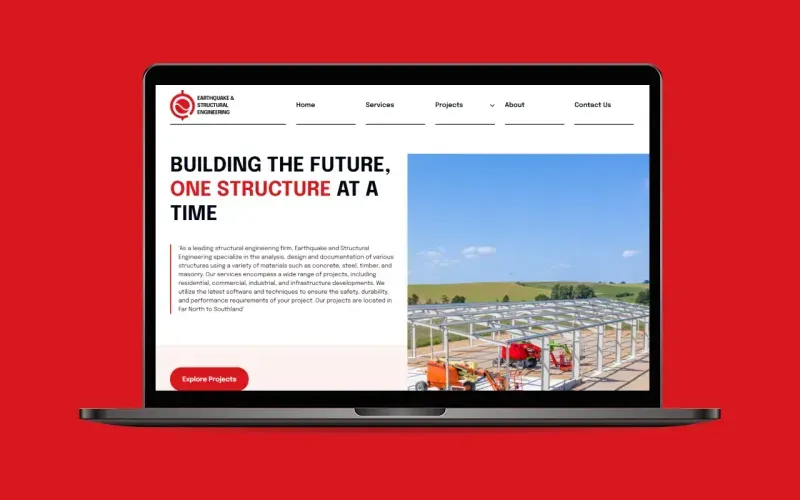
EQSE - Figma to Webflow development
EQSE
View Project Info
Client
EQSE
Service
Web Design
Figma to Webflow
Live Site
Project Intro

EQSE provides cost-effective structural engineering solutions across New Zealand, fusing expert design with seismic resilience, sustainability, and performance. Their old Webflow website is built using a typical template, so they need to design and build a new website.

What I Did

I worked closely with the EQSE team to redesign their outdated template website using Figma, incorporating their feedback throughout the process. Subsequently, I developed the new site in Webflow.

PageSpeed Insights
PageSpeed Insights scores showing Performance at 90, Accessibility at 93, Best Practices at 96, and SEO at 91.
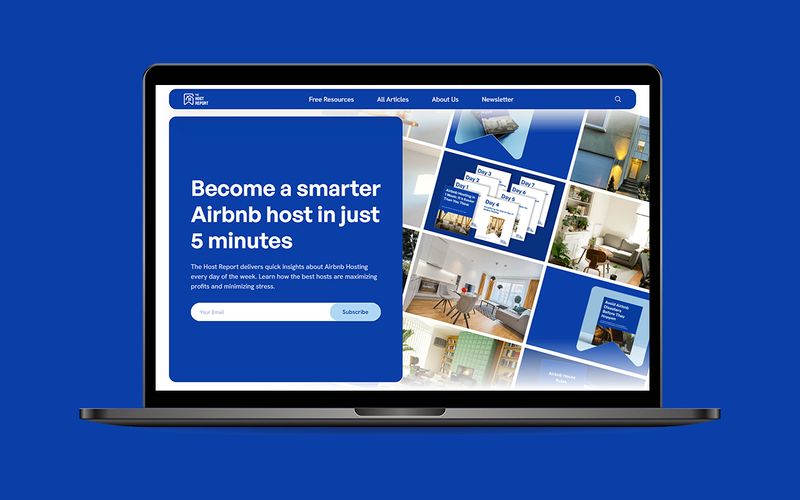
The Host Report - Figma to Webflow development
The Host Report
View Project Info
Client
The Host Report
Service
Figma to Webflow
Live Site
Project Intro

The Host Report provides weekly insights and market intelligence to short-term rental hosts and tech professionals, helping them stay ahead of trends in the dynamic STR industry. Founder wanted us to develop their website to easily manage content, newsletter subscriptions, and a scalable CMS structure.

What I Did

I collaborated closely with the founder to transform their Figma design into a fully functional, scalable Webflow website. This involved setting up a robust CMS system to facilitate frequent content updates and integrating newsletter capture through Beehiv using Zapier. The site was optimized for top page speed results, ensuring a seamless user experience.

PageSpeed Insights
Website speed test scores showing Performance 93, Accessibility 88, Best Practices 96, and SEO 92.
Client Review

"I had the pleasure of working with Sanjeewa, and I couldn’t be happier with the results. Sanjeewa and his team worked fast and efficiently, delivering a website that perfectly matched my vision and specifications. What stood out most was their exceptional communication throughout the process. Sanjeewa kept me informed every step of the way, responded promptly to all my questions, and provided valuable suggestions to improve the final product. Their attention to detail and commitment to quality made the entire experience seamless and stress-free. I am thrilled with the website they created and have no doubt I’ll be working with Sanjeewa again for future projects. If you're looking for a Webflow development team that combines technical expertise, great communication, and fast turnaround times, I highly recommend Sanjeewa!"

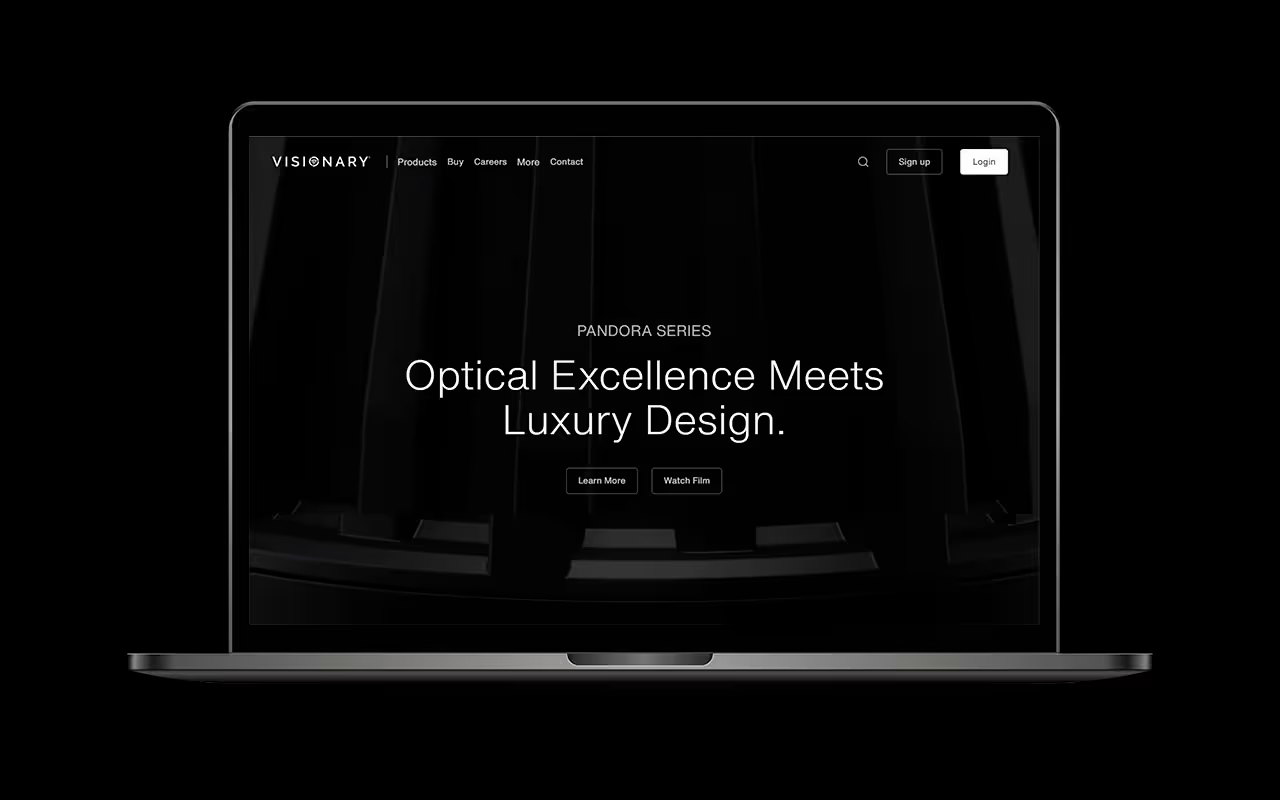
Visionary - Figma to Webflow development
Visionary
View Project Info
Client
Visionary Technologies
Service
Figma to Webflow
Live Site
Project Intro

Visionary Technologies is a New Zealand-based leader in premium lighting solutions, merging innovative LED systems with intuitive digital ordering platforms for designers, architects and electrical professionals. They reached out to me with a 80+ pages Figma design for a new website for their company.

What I Did

I worked closely with the CEO to meticulously transform their extensive Figma design into a fully functional, responsive Webflow site. Given the complexity and the sheer volume of over 80 pages, the project spanned approximately 1.5 months.

PageSpeed Insights
PageSpeed Insights scores showing Performance 98, Accessibility 86, Best Practices 100, and SEO 91.

Client Reviews

Review StarReview StarReview StarReview StarReview Star
"Sanjeewa is a great professional. He was knowledgeable, flexible and deliver a great work. He has a great understanding of website development and great technical capabilities. He helped us to launch our website with Webflow, he always went the extra mile to develop high-quality and detailed work."
CEO of XLINQ
Santiago Aragón
CEO of XLINQ
Review StarReview StarReview StarReview StarReview Star
"I had the pleasure of working with Sanjeewa, and I couldn’t be happier with the results. If you're looking for a Webflow development team that combines technical expertise, great communication, and fast turnaround times, I highly recommend Sanjeewa!"
Founder of The Host Report
Dominic Trovato
Founder of The Host Report
Review StarReview StarReview StarReview StarReview Star
"Sanjeewa always goes above and beyond, for us, and I love working with him. He is very knowledgeable about not only the platform, but web development as a whole. I highly recommend his services to anyone looking for a Webflow developer."
Zack Towner
Zack Towner
Owner of ZTown Media
Review StarReview StarReview StarReview StarReview Star
"I am very pleased with the work done. Sanjeewa patiently made all the changes and checked the issues. completed the task as quickly as possible."
Rafael Rasito
Rafael Rasito
Marketing Manager of VSCLT
Review StarReview StarReview StarReview StarReview Star
"Sanjeewa is always a joy to work with. He is good at what he does and is always willing to find solutions and works quickly and efficiently. Will continue to work with him in the future!"
Reviewer Image
Aaron Miles
Photographer/ Videographer
Review StarReview StarReview StarReview StarReview Star
"Sanjeewa was excellent. I highly recommend him. He did everything he could to get the project done to my spec."
Reviewer Image
Mike Battle
Screen Writer & Podcaster

WordPress to Astro Migration Process

[STEP-1]
Site & SEO Audit

I inventory your WordPress site and map:

  • Pages, posts, custom post types, and ACF fields
  • Every plugin and the job it actually does
  • Permalink structure and current rankings

You get a fixed quote and a migration risk map. If your plugin stack means WordPress is still the right home, I say so here.

[STEP-2]
Content Export

Your content comes out through the WordPress REST API into Sanity or MDX: posts, pages, custom post types, categories, authors, and images. You review the field by field mapping before the build starts, so nothing is lost in translation.

[STEP-3]
Rebuild in Astro

I rebuild your design as clean Astro components, matching it one to one or improving it where you want. Shortcodes and embeds become components, forms move to hosted form handling, and the plugin stack retires. Weekly preview links, not status reports.

[STEP-4]
SEO-Safe Cutover

Launch protects everything you have earned:

  • Permalinks preserved exactly, including date-based patterns
  • 301 redirects mapped for anything that must change
  • Yoast or Rank Math titles and descriptions carried over
  • Sitemap resubmitted to Search Console

The switch happens at a quiet hour with your old site ready as a fallback.

[STEP-5]
Handoff & Support

You get the repo, handoff docs, and a recorded walkthrough of the build and the CMS. I monitor Search Console for 30 days after launch, and fixes in that window are included.

Start a Project

WordPress to Astro FAQ

Q1. Can you migrate my blog with all its posts?
Yes, and blog size barely changes the timeline because the export is scripted through the WordPress REST API. Hundreds or thousands of posts come over with their categories, tags, authors, dates, and images, and you review the mapping before anything is rebuilt.
Q2. What happens to my permalinks?
They stay identical wherever possible, including date-based patterns like /2024/03/post-name/. Astro routes are built to match your current structure, and any URL that must change gets a 301 redirect. URL parity is most of what protects rankings in a migration.
Q3. What about custom post types and ACF fields?
They map cleanly: each custom post type becomes a Sanity document type or an MDX collection, and ACF fields become structured fields you can still edit. The audit produces the field by field mapping table, and you approve it before the build starts.
Q4. Do my Yoast or Rank Math settings carry over?
Yes. Titles, meta descriptions, and canonicals are exported with the content and applied to the new pages, then schema is rebuilt properly in the code instead of through a plugin. Parity first, improvements after: that order is what keeps rankings stable.
Q5. What replaces my plugins?
The audit lists every plugin and its actual job. Forms move to hosted form handling, SEO plugins become code you own, caching and security plugins become unnecessary on a static site, and analytics keep working as before. Plugins that are genuinely an application are the signal to stay on WordPress.
Q6. When should I NOT leave WordPress?
When the plugins are the product: membership sites, LMS platforms, WooCommerce stores with deep customization, or editorial teams wired into WordPress workflows. If you want easier visual editing rather than code ownership, WordPress to Webflow is the better move, and I run those too. The audit ends with an honest recommendation either way.
Q7. How does my team edit content afterward?
Sanity gives your team a visual studio that most editors find calmer than wp-admin: no update banners, no plugin notices, just content. MDX means editing markdown files in the repo, which suits developer-comfortable teams and costs nothing. We pick in the audit.
Q8. What does it cost and how long does it take?
From $1,250 fixed, with most marketing sites taking 2 to 4 weeks. The audit gives you the exact number up front, and the ongoing saving is real: hosting drops from $25 to $100 per month to $0 to $20, with no plugin subscriptions. Full ranges are on the pricing page.

Ready to Retire the Update Treadmill?

Book a free 30 minute migration audit. You talk to me directly, get an honest stay-or-go recommendation, and a fixed quote if leaving WordPress is the right call.